Effects
Effects and event subscriptions hold the code that does work outside the model, such as network calls and timers, so event handlers only change the model.
Add an effect
withEffect(eventType, effect) adds an effect that runs after the event handlers for that event.
The effect gets the model, the event, the event context, and a publish function.
- The model is a frozen snapshot, taken right after the effect’s own event was handled.
publish(eventType, event)publishes an event to the effect’s own store. To publish to another store, see talking to other stores.- If a preview handler cancels the event, its effects don’t run.
The bus runs effects after the event handlers, and before observers get the update. See state change workflow.
import { EventBus } from 'esp-js';

type CounterModel = { count: number };

const bus = new EventBus();

bus.storeBuilder<CounterModel>('counter', { count: 0 })
    .withEventHandler('Increment', (draft) => {
        draft.count++;
    })
    .withEffect('Increment', (model) => {
        console.log('effect sees:', model.count);
    })
    .withEventHandler('IncrementTwice', () => {
        bus.publishEvent('counter', 'Increment', {});
        bus.publishEvent('counter', 'Increment', {});
    })
    .build();

bus.getStoreModelObservable<CounterModel>('counter')
    .subscribe(model => console.log('update:', model.count));

bus.publishEvent('counter', 'IncrementTwice', {});
Output:
update: 0
effect sees: 1
effect sees: 2
update: 2
Each effect sees the model as it was after its own Increment event.
Async work through a service
Put the async call in a service, and call the service from an effect. When the call finishes, the effect publishes an event with the result, and an event handler puts the result in the model.
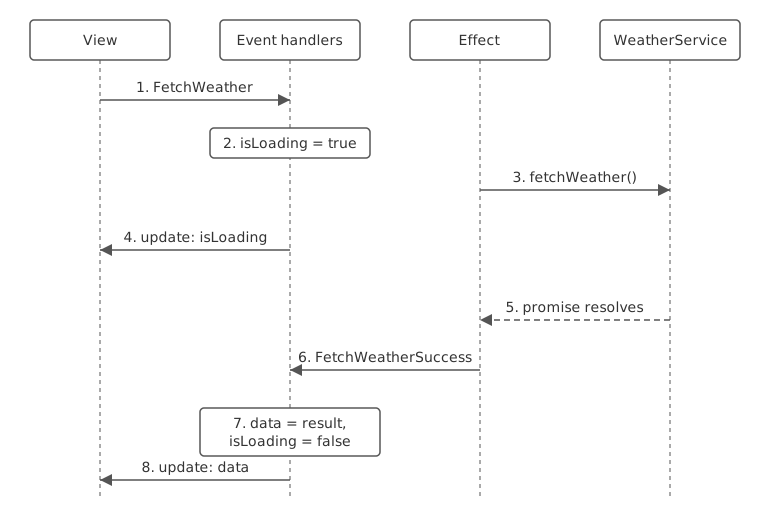
- The view publishes
FetchWeather. - The event handler sets
isLoadingtotrue. - The effect calls
fetchWeather()on the service, which returns a promise. - The view gets the model with
isLoading: true. - Later, the promise resolves.
- The effect publishes
FetchWeatherSuccesswith the data. - Its event handler stores the data and sets
isLoadingtofalse. - The view gets the model with the data.
This store is based on the weather store in the example app. It takes the service as an argument. In an esp-js-ui app, the module resolves the service from its container: see services.
export type WeatherData = { temperatureCelsius: number };

export interface WeatherService {
    fetchWeather(latitude: number, longitude: number): Promise<WeatherData>;
}
import type { EventBus } from 'esp-js';
import type { WeatherData, WeatherService } from './weatherService';

export type WeatherModel = {
    isLoading: boolean;
    error: string | null;
    latitude: number;
    longitude: number;
    data: WeatherData | null;
};

export const registerWeatherStore = (bus: EventBus, service: WeatherService, storeId: string): void => {
    const initialModel: WeatherModel = { isLoading: false, error: null, latitude: -31.95, longitude: 115.86, data: null };
    bus.storeBuilder<WeatherModel>(storeId, initialModel)
        .withPreviewHandler('FetchWeather', (model, event, eventContext) => {
            if (model.isLoading) {
                eventContext.cancel();
            }
        })
        .withEventHandler('FetchWeather', (draft) => {
            draft.isLoading = true;
            draft.error = null;
        })
        .withEffect('FetchWeather', (model, event, eventContext, publish) => {
            service.fetchWeather(model.latitude, model.longitude)
                .then(data => publish('FetchWeatherSuccess', data))
                .catch(() => publish('FetchWeatherError', { message: 'Failed to load weather data' }));
        })
        .withEventHandler('FetchWeatherSuccess', (draft, event: WeatherData) => {
            draft.isLoading = false;
            draft.data = event;
        })
        .withEventHandler('FetchWeatherError', (draft, event: { message: string }) => {
            draft.isLoading = false;
            draft.error = event.message;
        })
        .build();
};
The preview handler cancels FetchWeather while a fetch is already running.
With a service that returns { temperatureCelsius: 21 }, an observer that logs isLoading and data prints:
isLoading: false data: null
isLoading: true data: null
isLoading: false data: { temperatureCelsius: 21 }
Errors in effects
- If an effect throws, the bus halts, as it does for a handler.
- The bus doesn’t catch a rejected promise. Catch it in the effect and publish an error event, as
registerWeatherStoredoes. - If the store is removed, or the bus is disposed, before your promise resolves,
publishthrows inside your promise, and the promise rejects with that error.
Event subscriptions
withEventSubscription(factory) adds code that publishes events to the store from outside, such as a timer or a socket.
- The bus calls
factory(publish)when you callbuild().publishsends events to this store. - The factory returns a
Disposable: an object with adispose()method. - The bus calls
dispose()when the store is removed withremoveStoreor the bus is disposed.
import { EventBus } from 'esp-js';

type ClockModel = { ticks: number };

const bus = new EventBus();

bus.storeBuilder<ClockModel>('clock', { ticks: 0 })
    .withEventHandler('Tick', (draft) => {
        draft.ticks++;
    })
    .withEventSubscription((publish) => {
        console.log('subscription started');
        const intervalId = setInterval(() => publish('Tick', {}), 100);
        return {
            dispose: () => {
                clearInterval(intervalId);
                console.log('subscription disposed');
            },
        };
    })
    .build();

bus.getStoreModelObservable<ClockModel>('clock')
    .subscribe(model => console.log('ticks:', model.ticks));

setTimeout(() => bus.removeStore('clock'), 250);
Output:
subscription started
ticks: 0
ticks: 1
ticks: 2
subscription disposed