State change workflow
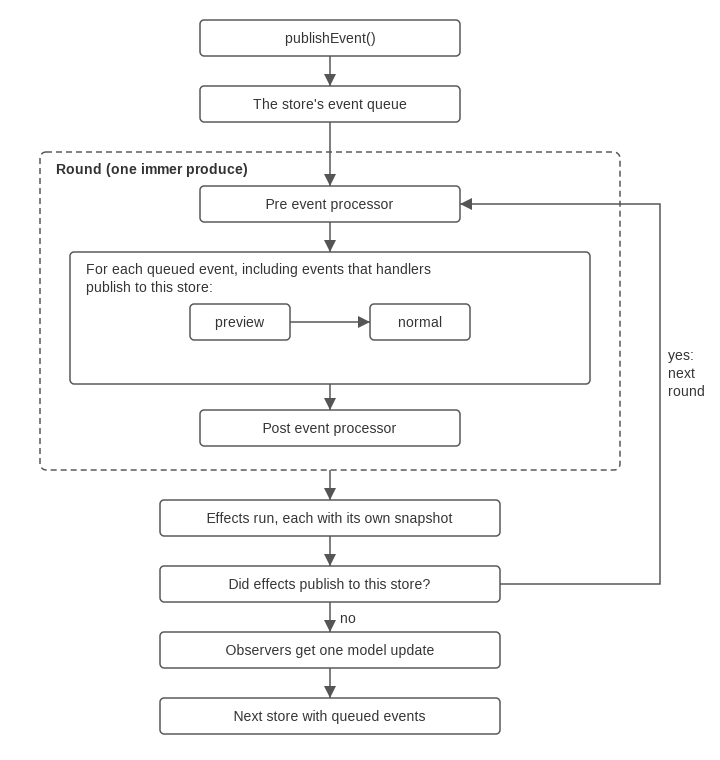
This page lists the steps the event bus takes, for each store, after you publish an event.
Rounds
The bus processes a store’s event queue in rounds.
A round is one immer produce call, so every handler in the round changes the same draft.
- The pre event processor runs.
- Each queued event goes through the stages.
- Events that handlers publish to the same store join the same round.
- The post event processor runs.
Stages
Each event goes through these stages, named by the ObservationStage values:
preview: the preview handlers run. A preview handler can calleventContext.cancel(). A canceled event skips the normal stage and its effects.normal: the event handlers run.
Canceling at the normal stage throws. For work that runs after an event has changed the model, use an effect.
Effects
After each event that has effects, the bus takes a frozen snapshot of the model. When the round ends, the effects run, each with the snapshot from its own event. If the effects publish events to their own store, those events start another round.
The model update
When the store’s queue is empty, the bus sends observers one update with the final model. Then it processes the next store with queued events, oldest queue first. An observer can rely on its own store’s update coming after that store’s events. Don’t rely on the order of updates across stores.
This sample shows the order. The effect publishes a second Increment, which starts a second round:
import { EventBus } from 'esp-js';

type CounterModel = { count: number };

const bus = new EventBus();

bus.storeBuilder<CounterModel>('counter', { count: 0 })
    .withPreEventProcessor(() => console.log('pre event processor'))
    .withPreviewHandler('Increment', (model, event, eventContext) => console.log('preview:', eventContext.eventType))
    .withEventHandler('Increment', (draft, event, eventContext) => {
        draft.count++;
        console.log('handler:', eventContext.eventType);
    })
    .withEffect('Increment', (model, event, eventContext, publish) => {
        console.log('effect, count is', model.count);
        if (model.count === 1) {
            publish('Increment', {});
        }
    })
    .withPostEventProcessor((draft, eventsProcessed) => console.log('post event processor:', eventsProcessed))
    .build();

bus.getStoreModelObservable<CounterModel>('counter')
    .subscribe(model => console.log('update, count is', model.count));

bus.publishEvent('counter', 'Increment', {});
Output:
update, count is 0
pre event processor
preview: Increment
handler: Increment
post event processor: [ 'Increment' ]
effect, count is 1
pre event processor
preview: Increment
handler: Increment
post event processor: [ 'Increment' ]
effect, count is 2
update, count is 2
The observer gets one update for both rounds.
The dispatch limit
The bus counts the events it dispatches until its queues are empty.
When the count reaches 10,000, it throws Circular event dispatch detected and halts.
A handler or an effect that keeps publishing to its own store hits this limit, and so do stores that keep publishing to each other.
import { EventBus } from 'esp-js';

type CounterModel = { count: number };

const bus = new EventBus();

bus.storeBuilder<CounterModel>('counter', { count: 0 })
    .withEventHandler('Increment', (draft) => {
        draft.count++;
    })
    .withEffect('Increment', (model, event, eventContext, publish) => {
        publish('Increment', {});
    })
    .build();

try {
    bus.publishEvent('counter', 'Increment', {});
} catch (error) {
    console.log((error as Error).message);
}
Output:
Circular event dispatch detected, dispatch loop halted. 10000.